Traceability Tooling
|
status: valid
security: NO
safety: QM
|
||||
Traceability Tooling#
This document describes tools or some functionality of them, that can be used regardless of source code language.These tools are also provided by S-CORE projects, like Docs-As-Code.
Link Requirements to Source Code#
This functionality provides the ability to link any requirement to any part of the source code. It is possible to link as many places of source code as are needed. All of them will show up in the requirement.
All that is needed is to write the ‘template string’ that the program is looking for. It is either # req-Id: <your requirement> or # req-traceability: <your requirement> If there is multiple requirements that need to be linked to this place in the source code, repeat the line for each one.
As an example for one requirement:
# req-Id: tool_req__docs_common_attr_title
def your_function(args):
   """Your function that implements the requirement partiall or fully"""
   ...
An Example of multiple requirements:
# req-Id: tool_req__docs_common_attr_title
# req-Id: tool_req__docs_common_attr_status
# req-Id: tool_req__docs_common_attr_safety
def your_function(args):
   """Your function that implements the requirement partiall or fully"""
   ...
The tool will look through any files except:
Directories or files that start with ‘.’ or ‘_’ It skips all files that end with one of the following: - .pyc - .so - .exe - .bin - .rst - .md
The template string works regardless of the language. This means both following examples are valid and will work.
// # req-Id: comp_req__containers_rust__fixed_vector
int your_function() {
   ...
}
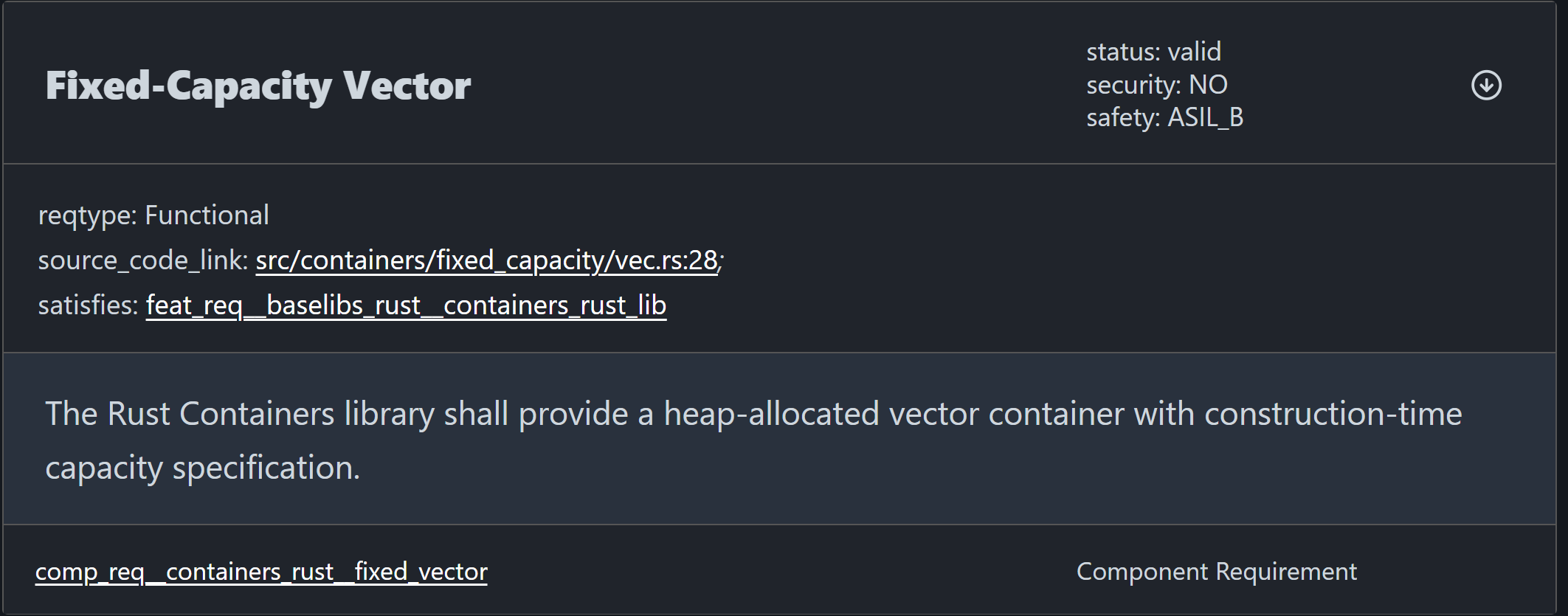
/// # req-Id: comp_req__containers_rust__fixed_vector
impl<T> FixedCapacityVec<T> {
   ...
}
Here is how this would look rendered:
Link Requirements to Tests#
There is a tool that has the ability to link requirements to your tests as well as provide virtual tests sphinx-needs in order to make statistics etc. possible to be rendered.
The implementation here differs based on your source code language though. So it is best if you read up in the language you want to develop in how to do this.
In rough terms the data flow looks as follows.
Your testing framework produces XML files with pre-defined properties. These XML files are loaded and parsed. The test needs to get build details from the parsed data and link it to the requirements mentioned.
You can now also do statistics on your tests.
.. needtable:: SUCCESSFUL TESTS
   :filter: result == "passed"
   :tags: TEST
   :columns: name as "testcase";result;fully_verifies;partially_verifies;test_type;derivation_technique;id as "link"


.. needpie:: Test Results
   :labels: passed, failed, skipped
   :colors: green, red, orange
   :legend:

   type == 'testcase' and result == 'passed'
   type == 'testcase' and result == 'failed'
   type == 'testcase' and result == 'skipped'
Find the rendered examples here: Docs as Code Test Statistics examples
Specific Language Implementations#
Python implementation [NOT LINKED YET] RUST Implementation [NOT LINKED YET] CPP Implementation [NOT LINKED YET]
Find More Information#
If you need more information, you can read it all in the Docs as Code Documentation