First Eclipse S-CORE Module#
Before starting, ensure you are an official contributor to the Eclipse S-CORE project. Otherwise, you will not have required permissions. Instructions can be found in Actions to ensure Proper Contribution Attribution in Eclipse Eclipse S-CORE.
Once you have created an Eclipse account, accepted Eclipse Contributor Agreement (ECA), and linked your GitHub account with your Eclipse Account, contact one of the Eclipse S-CORE Project Leads (listed at the official Eclipse SDV S-Core webpage). They will add you to the list of the official contributors of the Eclipse S-CORE GitHub organization.
The recommended communication channel to approach Eclipse S-CORE project leads is the eclipse sdv slack channel.
Creating a Repository for Your Module#
After becoming part of Eclipse S-CORE GitHub organization, you can create a repository for your module. Repository creation follows Eclipse organizational rules. Most configuration is handled via otterdog configuration located in:
Create a private fork of this repository and modify the file:
Add your repository definition, e.g.:
newModuleRepo('logging') {
    description: "Repository for logging framework",
},
newModuleRepo('scrample') {
    description: "Repository for example component",
},
newModuleRepo('inc_abi_compatible_datatypes') {
    description: "Incubation repository for ABI compatible data types feature",
},
Then, create a PR in the original https://github.com/eclipse-score/.eclipsefdn repository. The PR must be approved by:
Eclipse S-CORE project lead
Eclipse Foundation Security Team
Tip
To speed up approval, mention both groups in your PR comment:
@eclipse-score/automotive-score-project-leads
@eclipse-score/eclipsefdn-security

Please approve.
Repository Layout#
Once merged, your new repository will appear in the Eclipse S-CORE GitHub organization repositories overview.
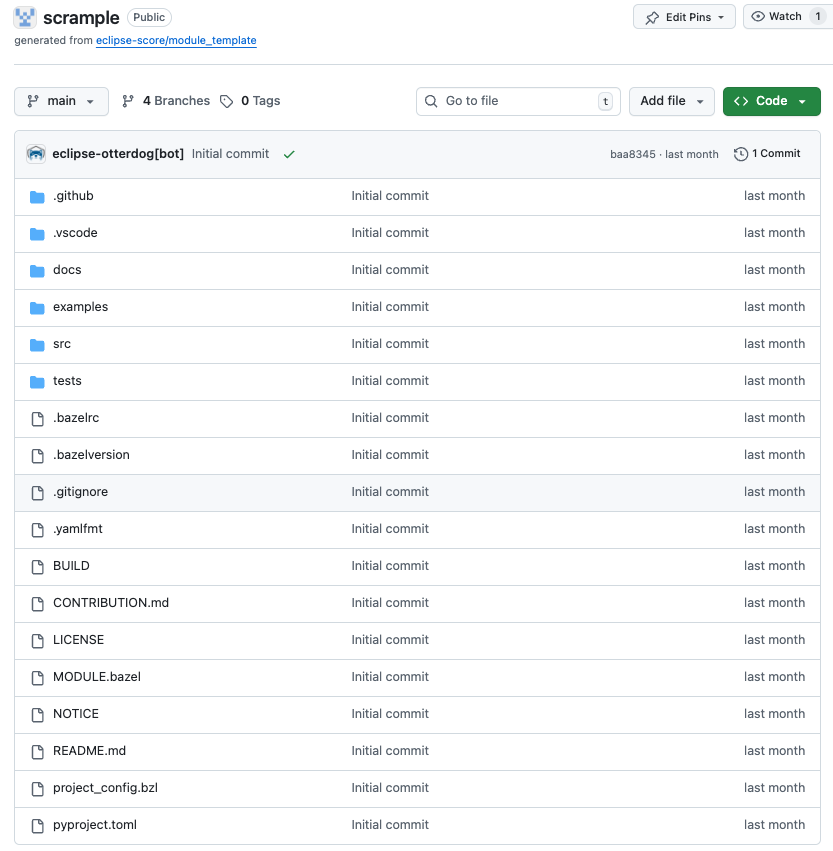
All repositories are created using the Eclipse S-CORE repository template <https://github.com/eclipse-score/module_template>:
The README.md file already explains the basic structure. Below is an overview of the most relevant files and folders.
.github/workflows/#
Contains CI/CD workflows (build, unit-tests, integration gate checks).
.vscode#
Provides Eclipse S-CORE recommended VS Code setup, including code completion patterns for requirements and architecture in .vscode/restructuredtext.code-snippets.
docs#
Place all module documentation here in rst format. Examples follow later in this guide.
Tip
We try to describe most common workflows for developers. It is worth checking it.
src#
Self-explainatory: source code
test#
Self-explainatory: tests
.bazelrc#
Defines bazel configuration for your the module. Important entries in .bazelrc file include:
1build --java_language_version=17
2build --tool_java_language_version=17
3build --java_runtime_version=remotejdk_17
4build --tool_java_runtime_version=remotejdk_17
5
6test --test_output=errors
7
8common --registry=https://raw.githubusercontent.com/eclipse-score/bazel_registry/main/
9common --registry=https://bcr.bazel.build
Line number 8 points to the Eclipse S-CORE https://github.com/eclipse-score/bazel_registry, where all official versions of Eclipse S-CORE modules are published.
Line number 9 points to the common bazel registry, where common bazel modules are made available for everyone.
This means, once we´re referencing a depending module with our scrample application, bazel will start searching it in one of these two locations.
MODULE.bazel#
This file turns your repository into a bazel module.
Let us check MODULE.bazel initial content:
1module(
2    name = "cpp_rust_template_repository",
3    version = "1.0",
4)
Here, we´re making the first declaration of our module by defining a name and a version. Please be aware, that only after our module was published in the Eclipse S-CORE bazel registry, other modules can access it.
Rename the module and replace cpp_rust_template_repository by score_scrample.
1module(
2    name = "score_scrample",
3    version = "1.0",
4)
Please be aware, according to Eclipse S-CORE´s naming convention all module names must start with score_ prefix.
 1bazel_dep(name = "rules_python", version = "1.4.1")
 2
 3PYTHON_VERSION = "3.12"
 4
 5python = use_extension("@rules_python//python/extensions:python.bzl", "python")
 6python.toolchain(
 7    is_default = True,
 8    python_version = PYTHON_VERSION,
 9)
10use_repo(python)
11
12# Add GoogleTest dependency
13bazel_dep(name = "googletest", version = "1.17.0")
14
15# Rust rules for Bazel
16bazel_dep(name = "rules_rust", version = "0.63.0")
17
18# C/C++ rules for Bazel
19bazel_dep(name = "rules_cc", version = "0.2.1")
In the code snippet above, we declare dependencies to modules, that are publicly available in common bazel registry, e.g. for unit test execution with gtest.
 1# LLVM Toolchains Rules - host configuration
 2bazel_dep(name = "toolchains_llvm", version = "1.4.0")
 3
 4llvm = use_extension("@toolchains_llvm//toolchain/extensions:llvm.bzl", "llvm")
 5llvm.toolchain(
 6    cxx_standard = {"": "c++17"},
 7    llvm_version = "19.1.0",
 8)
 9use_repo(llvm, "llvm_toolchain")
10use_repo(llvm, "llvm_toolchain_llvm")
11
12register_toolchains("@llvm_toolchain//:all")
Here we add a llvm toolchain and register its usage in our module, so that we can build our source code. In upcoming chapters, we will talk about this in more detail.
1# tooling
2bazel_dep(name = "score_tooling", version = "1.0.1")
3
4#docs-as-code
5bazel_dep(name = "score_docs_as_code", version = "1.1.0")
Finally, we add a dependency to Eclipse S-CORE native modules “score_tooling” and “score_docs_as_code”. These enable documentation builds and tooling checks (e.g., license checker).
Tip
Working across multiple modules and repositories can be challenging. Use the following approach during development:
use git_override() if you want to use a version of another module, that is currently not officially availabe in the bazel registry.
use local_path_override() if you want to use your local version of the module, e.g. during active development.
BUILD#
The bazel BUILD file contains main bazel targets on the top level of the scrample project:
1load("@score_docs_as_code//:docs.bzl", "docs")
2load("@score_tooling//:defs.bzl", "copyright_checker", "dash_license_checker", "setup_starpls", "use_format_targets")
3load("//:project_config.bzl", "PROJECT_CONFIG")
First, we load bazel rules and macros, implemented in Eclipse S-CORE context from the modules, that we’ve defined as dependencies in the MODULE.bazel file, e.g. https://github.com/eclipse-score/docs-as-code.
 1copyright_checker(
 2    name = "copyright",
 3    srcs = [
 4        "src",
 5        "tests",
 6        "//:BUILD",
 7        "//:MODULE.bazel",
 8    ],
 9    config = "@score_tooling//cr_checker/resources:config",
10    template = "@score_tooling//cr_checker/resources:templates",
11    visibility = ["//visibility:public"],
12)
13
14dash_license_checker(
15    src = "//examples:cargo_lock",
16    file_type = "",  # let it auto-detect based on project_config
17    project_config = PROJECT_CONFIG,
18    visibility = ["//visibility:public"],
19)
Second, we define bazel targets for copyright_checker and dash_license_checker, based on bazel rules implemented and imported from https://github.com/eclipse-score/tooling module.
1docs(
2    source_dir = "docs",
3)
Finally, the docs target builds all documentation in the .rst format, which is located in the docs folder and all its subfolders. This functionality is implemented in https://github.com/eclipse-score/docs-as-code module.